I build websites in Webflow, so you should know my bias up front. I also built on WordPress for years, and I still get asked the same question: should I use Webflow or WordPress? This post is my answer for 2026, with Elementor covered as well, because most people who ask about WordPress are really asking about WordPress with a page builder on top.
It replaces three older posts of mine (the 2023 and 2025 Webflow vs WordPress comparisons and my Elementor vs Webflow post). If you want the platform explained from scratch first, read What is Webflow.
The short answer
- Choose Webflow if design matters, you want one managed platform, and you do not want to spend your time on updates, plugins and security patches.
- Choose WordPress if you need a very large plugin ecosystem, full control over your hosting and backend, or a build that a big pool of developers can pick up and maintain.
- Choose Elementor only if you are on WordPress already, you are on a tight budget, and you accept the trade-offs in code quality and speed.
Everything below explains why, category by category.
What is WordPress
WordPress was started in 2003 by Mike Little and Matt Mullenweg. It is open source, so anyone can view, change and distribute the code. That keeps the entry cost low, but it does not make a WordPress site free. The real costs sit in hosting, themes, plugins, maintenance and developer time.
WordPress is still the most widely used CMS on the web, by a wide margin. That is a fair argument for it: there are plenty of developers, agencies, themes and tutorials. But being the most used does not make it the best fit for every project. It is also the oldest of the options, and it shows in places.

WordPress.org vs WordPress.com
These two are often mixed up, and the difference matters when you compare platforms.
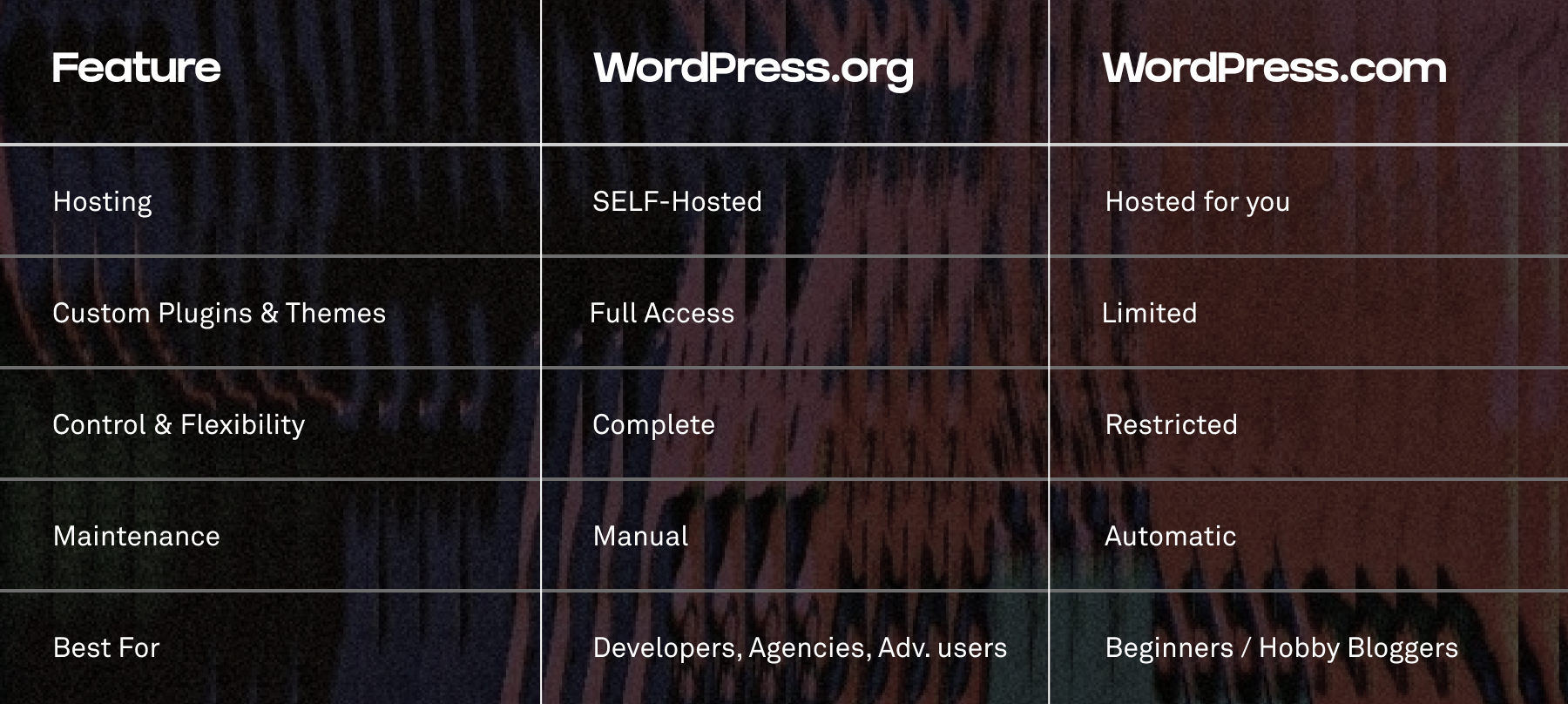
WordPress.org is the free, self-hosted software. You download it, put it on your own hosting and control everything: themes, plugins, custom code. You are also responsible for everything: hosting, updates, backups and security.
WordPress.com is the hosted service run by Automattic. It handles hosting and updates for you, which is easier for beginners, but you are tied to their infrastructure and some features, such as installing your own plugins, depend on the plan you pick.
When I compare WordPress with Webflow for a business or design-led website, I mean WordPress.org. That is the version where you get the flexibility people praise WordPress for.
What is Webflow
Webflow is a visual website builder that writes clean HTML, CSS and JavaScript for you, with a built-in CMS, hosting, SEO settings and a client-friendly editor. Designers, developers and content editors work in the same tool. There are no core updates or plugin updates for you to run, because Webflow maintains the platform itself. When you need more, there is an app marketplace and an API for connecting other tools.
I wrote a full explanation here: What is Webflow.

Webflow vs WordPress: the comparison
I have worked on both platforms for years. This is not a blind endorsement of Webflow, it is what I have seen on real projects.
Market share: WordPress leads, Webflow is small but growing
WordPress runs the largest share of all websites. Webflow runs a small fraction of that, but it has been growing while WordPress has been flat or slipping slightly in the usual trackers. Market share tells you how popular a tool is. It does not tell you whether it fits your project, so I would not choose a platform on that number alone. I wrote the first version of this comparison in 2023, and the direction I described then has held.
Build speed
WordPress
WordPress is seen as easy to use, but that reputation comes from the early 2000s, when the comparison was hand-coded sites. Next to modern builders it is clunky. You end up with plugins from different developers, each with its own interface, and conflicts between themes, plugins and core updates are common.
A fully custom design means a custom theme, which means a PHP developer, which means time and budget. For a fairer comparison I look at visual builders. In my experience the native block editor (Gutenberg) is the best option inside WordPress. I prefer it over Elementor or Divi, which tend to produce heavier code and more bugs. Gutenberg still feels limited, but with a good setup you can launch a decent site in a couple of weeks.

Webflow
The essentials are built in, so there is nothing to install before you can start designing. That alone saves a lot of setup. For planning, I sometimes use Relume to generate sitemaps and wireframes, which gets the structure done quickly. I also use the Client-First naming system on every project so the site stays organised as it grows.
Coming from WordPress, my own builds in Webflow take clearly less time. I am not going to put a number on it, because it depends on the project, but the gap is real.

Design freedom
WordPress
Design flexibility depends on themes, plugins and page builders. Past the basic templates you end up stitching add-ons together, each with its own limits. The only real way to get full creative control is a custom theme, and that needs a PHP developer.
Webflow
Webflow is a blank canvas. You work with real CSS concepts in a visual interface, so what you can build depends on your design, not on a template. When you need more, you can add custom code, and animation is strong, including GSAP, which is now built into Webflow's interactions. Design and development happen in one place, so there are fewer handoffs between a designer and a developer.
Functionality and performance
WordPress
The plugin ecosystem is huge and can take a site almost anywhere. The cost is complexity. Plugins from different developers can clash, and as you stack them up the site gets slower and harder to maintain.
Performance depends heavily on how the site is built. Page builders like Elementor and Divi tend to add heavy markup, which can hurt loading speed and Core Web Vitals. A careful setup can be fast: a lean theme or Gutenberg, a caching plugin, image optimisation, modern image formats such as WebP or AVIF, good hosting and as few plugins as possible. So WordPress can be fast, but it takes active effort and technical knowledge.

Webflow
Most things you would need a plugin for in WordPress are built in. There is still an app marketplace, but it is smaller and more curated, which means fewer performance risks and less maintenance. Outside tools fill the gaps: Finsweet for advanced CMS filtering and sorting, Memberstack for member areas and gated content, and Make or Zapier to connect Webflow to a CRM, email tool or database.
Webflow outputs clean, semantic HTML, CSS and JavaScript, and hosting runs on AWS with a global CDN, so pages are served from a location close to the visitor. Image conversion to WebP or AVIF is built in. Unless you build something very heavy, you get solid performance without extra setup.
Is Webflow faster than WordPress? Out of the box, usually yes, because there is less code and no plugin stack to slow it down. A well-tuned WordPress site on good hosting can match it. The difference is how much work it takes to get there. Test your own site with PageSpeed Insights rather than trusting any general claim, mine included.

Community, support and resources
WordPress
WordPress has been around for decades, so the knowledge is out there. In my experience, though, it is hard to sort through. When I search for help I find a lot of outdated content and conflicting answers, and forum replies can be slow.
Webflow
The Webflow community is smaller but tight. Webflow University is one of the better free learning resources I have used, and the forum and community groups have answered most of my questions quickly. Third-party teams such as Relume, Memberstack and Finsweet add to the ecosystem.

SEO
Is Webflow good for SEO? Yes, and I go into detail in Is Webflow good or bad for SEO. Here is the comparison in short.
WordPress has a strong SEO reputation, mostly thanks to plugins such as Yoast and Rank Math, which handle meta data, sitemaps and content checks. The trade-off is that essential SEO work depends on third-party plugins, and the more add-ons you run, the more you risk slowing the site down.
Webflow has the basics built in: meta titles and descriptions, alt text, clean semantic markup, redirects, automatic sitemap and robots.txt control. You do not need a plugin for any of that. What Webflow does not do is write your content or build your links for you, and neither does WordPress. If you are new to SEO, start with my SEO beginners guide.
Localisation
On WordPress, multilingual sites usually mean a plugin such as TranslatePress or WPML. They work, but they are another paid add-on to keep updated, and prices change, so check the plugin's own site.
Webflow has localisation built into the platform. You can translate content by language and region, change visuals and layout per locale, and use automatic translation as a starting point. It is a paid add-on, so check the current price on the Webflow pricing page before you plan a multilingual site. I would still have a native speaker review any machine translation before it goes live.

Collaboration
On WordPress, collaboration is a patchwork of user roles and third-party tools for comments and approvals. It works, but it is clunky when several people need to work on the site at once.
Webflow is cloud-based and built for several people working in it, with roles, comments and shared access. On the Enterprise plans there is also page branching, which lets you change a copy of a live page safely and merge it when it is ready. For a small business site you will not need that, but it is useful for larger teams.

Ease of use and learning curve
WordPress
Most business owners I work with find the WordPress dashboard overwhelming, with many menus and settings that have nothing to do with day-to-day updates. When something breaks after a plugin update, you usually need a developer. Custom content types, such as case studies, events or team members, often need an extra plugin, which adds cost and complexity.

Webflow
Once the site is built, the Webflow Editor shows only what the editor needs. You click on the page, type, swap an image and publish. Clients tell me this is the part they like most. Custom content types are native: you set up CMS collections for blog posts, team members or events without a plugin.
To be fair, learning to build in Webflow takes time, especially if you are new to design tools and web concepts like the box model. Using a finished Webflow site is easy. Building one yourself is the steep part.

Security
WordPress
Because WordPress is open source and relies on third-party plugins, most breaches I know of come from outdated or neglected plugins and themes. You keep the core, the theme and every plugin up to date, add a security plugin and take regular backups. It is manageable, but it is ongoing work that someone has to own.
In 2024 and 2025 the dispute between WordPress.org and WP Engine also showed that the ecosystem depends on a few organisations, and that a conflict between them can affect live websites. I would not choose a platform on drama alone, but it is a risk worth knowing about if you run a business on WordPress.

Webflow
Webflow is a managed platform, so hosting, backups, encryption and platform updates are handled for you. There are no plugin vulnerabilities to patch. What Webflow lists as its security features:
- SOC 2 compliance
- Hosting on Amazon Web Services (AWS)
- SSL encryption, including custom SSL certificates
- DDoS protection
You still need to protect your own account with a strong password and two-step login, and be careful with third-party scripts you paste in.
Pricing
WordPress
The WordPress.org software is free, but a professional site is not. Budget for hosting, a premium theme or custom development, plugins for security, backups, SEO and multilingual features (many with yearly renewals), and ongoing maintenance. Over a few years, the plugin and maintenance costs often matter more than the hosting bill.
Webflow
Webflow charges a monthly or yearly subscription per site, with higher plans for CMS and e-commerce. Hosting, SSL and the CMS are included. The monthly price is usually higher than cheap WordPress hosting, but you pay less for plugins and maintenance. For most business sites that I build, the total cost over a few years comes out in Webflow's favour, but it is not true for every project, especially very simple ones. Check the current prices on the Webflow pricing page and the WordPress.com pricing page before you decide.
Elementor vs Webflow
A lot of people who search for "Elementor vs Webflow" or "Webflow or Elementor" are comparing two different things. Elementor is a page builder plugin that sits on top of WordPress. Webflow is a complete platform. So choosing Elementor also means choosing WordPress, hosting, plugins and updates.
What Elementor is good at
Elementor has a drag-and-drop editor with Content, Style and Advanced settings per widget, a large template library and a free version. For beginners and small budgets it is an easy way to get a decent-looking WordPress site without code. Elementor Pro adds more widgets, a theme builder and forms. Teams can set user roles to control who can edit.
Where it falls short
In my experience, widgets are not always consistent with each other, and you run into customisation limits that can be frustrating. Elementor also produces heavier code than Webflow, and it runs on a WordPress foundation that needs to be kept up to date. For SEO it depends on plugins such as Yoast or Rank Math, and every plugin you add costs a bit of performance.
Where Webflow is stronger
- Full control over layout, classes and structure, which means more precise designs.
- Cleaner code and built-in hosting, SEO tools and a CMS, with no plugin stack.
- Interactions and animation without extra plugins.
- A cleaner editing experience for clients.
Elementor vs Webflow at a glance
- Ease of start: Elementor is quicker for a beginner. Webflow has a steeper learning curve.
- Design control: Webflow is much more precise.
- Code and speed: Webflow is cleaner by default.
- Maintenance: Webflow is managed. Elementor needs WordPress upkeep.
- Cost: Elementor and WordPress are often cheaper at the start. Check current prices for both before comparing.
- Templates: Elementor has a larger library. Webflow templates are fully editable but there are fewer of them.
My recommendation: Elementor is a reasonable choice for a beginner on a tight budget. If your website is a serious part of your business, I would go with Webflow. And if you start with Elementor and outgrow it, you can migrate to Webflow later.
Which one should you choose?
Choose Webflow when:
- Brand and design are important to how your business is seen.
- You want to edit content yourself without worrying about updates.
- You prefer one platform with hosting, CMS and SEO tools included.
Choose WordPress when:
- You need a specific plugin or integration that only exists for WordPress.
- You want to host and control everything yourself.
- You have a developer or agency already maintaining a WordPress setup.
Choose Elementor when:
- You are staying on WordPress, your budget is tight, and design flexibility is not a priority.
Thinking about switching from WordPress to Webflow?
A move is easier than most people think, as long as you plan the redirects and keep your URLs and content in order. Expect some temporary movement in your rankings while search engines catch up. Here is my step-by-step guide: Website Migration to Webflow in 9 Easy Steps.
Frequently asked questions
Is Webflow better than WordPress?
For design-led business sites where you want low maintenance, I think so. For sites that depend on a specific WordPress plugin or that need full hosting control, WordPress is the better fit. It depends on the project.
Is Webflow faster than WordPress?
By default, usually. A tuned WordPress site can be just as fast, but it takes more work. Test your own pages with PageSpeed Insights.
Is Webflow or Elementor better?
Webflow gives you more design control, cleaner code and less upkeep. Elementor is cheaper and easier for a first site. See the Elementor section above.
Is Webflow cheaper than WordPress?
Not on day one. Over several years, once you count plugins, maintenance and developer hours, Webflow is often the same or cheaper for business sites. Check current prices for both.
Is Webflow good for SEO?
Yes. The basic technical SEO tools are built in. Read Is Webflow good or bad for SEO for the details.
What are the advantages and disadvantages of Webflow?
The advantages are design control, clean code, built-in hosting, CMS and SEO tools, and a clean editor for clients. The disadvantages are a steep learning curve if you build it yourself, a smaller plugin and developer ecosystem than WordPress, and a monthly subscription that you keep paying.
Questions? Let's talk
I run Rimbo Designs and build websites in Webflow for brands. If you are unsure which platform fits your project, or you want a second opinion on a WordPress site, get in touch. No pressure, just honest advice.
Branding
Brilliance
Sign up for your monthly dose of Branding Brilliance. Keep your brand sharp, your site smarter, and your strategy one step ahead.


Transform Your Online Presence!
Explore insightful articles in which I share my expert insights on Branding, UI/UX Design, and Online Marketing.